

Device credentials
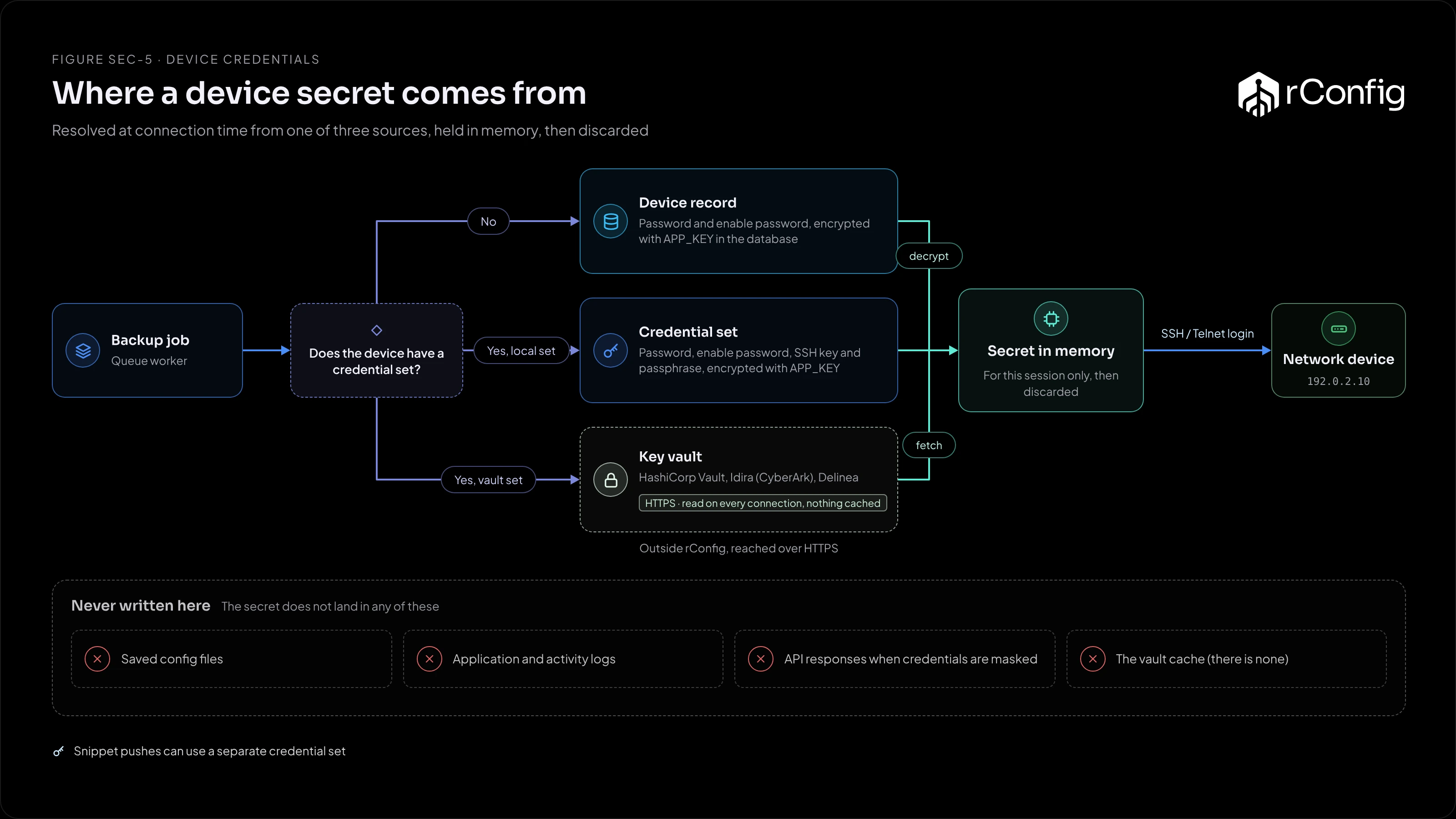
rConfig needs a working login for every device it backs up, so device credentials are the most valuable thing on the server. There are three places a device’s secret can come from, and the choice decides who can see it, how it is rotated, and what fails when it changes. This page compares them. Setting each one up is in the main docs, starting at Devices and Vault Credentials Overview.
Where secrets live
| Type | Stored where | Fits |
|---|---|---|
| Local credentials | On the device record in rConfig | Labs and one-off devices |
| Credential sets | Once in rConfig, encrypted at rest, shared by many devices | Most estates |
| Vault credential sets | In your key vault, read at connection time | Teams whose vault is already the source of truth and rotates passwords there |
A device uses its credential set when it has one, and its own stored username and password otherwise. Local credentials and credential sets are both encrypted with the system key (APP_KEY): device passwords and enable passwords, and for credential sets also SSH private keys and their passphrases. The username is not a secret and is stored as written.
Credential sets
A credential set keeps the secret in one place, so a password change is one edit, not one per device. Sets can’t be deleted while any device still uses them, which stops a cleanup from silently breaking backups. From V8.2.2 a device can also have a separate credential set used only for snippet pushes, so day-to-day backups can run on a read-only account and only change work uses an account that can write. See Devices.
Key vaults
With a vault, rConfig asks for the secret when it connects, maps the returned keys to username, password and enable password, and discards them when the operation ends. Nothing is cached, so the next backup after a rotation uses the new password. The trade-off is a runtime dependency on the vault: turn a vault off in rConfig and backups for its devices fail, with a message naming the vault, until it is on again.
HashiCorp Vault is verified. Palo Alto Networks Idira (CyberArk) Central Credential Provider and Delinea Secret Server are early access from V8.4.2. From V8.4.2 several vaults can be on at once, with each vault credential set tied to the vault it was created with. The vault’s own connection secrets (tokens, API passwords, client keys) are stored encrypted in rConfig and never sent back to the browser.
How lookups behave under load, during a vault outage and when you choose between vaults is covered in the Integrations guides:
 Uplink guideHow vault lookups workHow rConfig reads device credentials from HashiCorp Vault, Idira (CyberArk) or Delinea at connection time, and what that means for rotation and outages.Read the guide
SSH keys
A credential set can hold an SSH private key and passphrase instead of a password. The connection template switches key authentication on with sshPrivKey, a flag only: the key itself always comes from the credential set, never from the template. Private key authentication is supported on Pro. See the SSH private key template in the templates repository.
Rotation, and what breaks
| Source | When the device password changes | What fails if rConfig is not updated |
|---|---|---|
| Local credentials | Edit each device record | Every backup of that device, until it is edited |
| Credential set | Edit the set once | Every device on the set, at its next backup |
| Vault credential set | Nothing in rConfig: the next connection reads the new value | Only if the vault itself is off, unreachable or the secret path changes |
Two things make rotation riskier than it looks. A failed login is retried at each scheduled backup, so a stale password can trip a device’s own lockout or alert on repeated failures. And a changed enable password fails separately from the login, often after the session has opened. Rotate in rConfig at the same time as on the device, or use a vault so there is only one place to change.
Rotating APP_KEY, the key that encrypts stored credentials, is a different job with different risks. See protecting stored data.
Keeping secrets off screens and out of API responses
Encryption protects credentials in the database. It does nothing for a password shown on a device page or returned by the API. Two settings cover that:
MASK_DEVICE_CREDENTIALS=truein.envmasks device usernames and passwords in the UI and REST API, and replaces known device passwords in debug output with********. It is off by default.with_credentials=falseon REST API device calls leaves credentials out of the response even when masking is off. Integration code should always send it. See the API & Developer guides.
Config obfuscation is a separate feature: it masks secrets inside configuration text and diffs, not the credential fields.
How Security Center checks this layer
data.credentials_encrypted(Critical) confirms every stored credential is encrypted and thatAPP_KEYcan still decrypt it. A failure here after a key change means credentials have become unreadable.data.mask_credentialswarns when device credentials are not masked in the UI and API.data.failed_jobs_secretslooks for plain-text secrets left in failed job payloads.devices.telnetwarns about devices still backed up over Telnet, where the password crosses the network in clear text.