

Protecting stored data
Everything rConfig stores lands in one of two places: the database and the storage folder on disk. Both end up in backups, snapshots and copies you may not control as tightly as the server. This page explains what protects each kind of data at rest and on screen, how the system key ties them together, and what to plan for before you need it. The procedures are in the main docs: System Encryption Key, Config File Encryption and Config Obfuscation.
Three features, three different jobs
They are easy to confuse. They protect different things:
| Feature | Protects | Against | Notes |
|---|---|---|---|
System encryption key (APP_KEY) |
Device credentials (always), sessions, and config files when config encryption is on | Database exports, backups or unauthorised database access | Lose the key without a backup and encrypted data cannot be recovered |
| Config file encryption | Config file content on disk | Compromised storage, decommissioned disks, stolen backups | Metadata stays unencrypted so search and listings keep working. Adds CPU cost on access |
| Config obfuscation | Secrets inside config text, diffs and API output | Casual exposure to read-only users, screen shares | Masks at render time only. Stored files are unchanged. Chosen roles can see unmasked output |
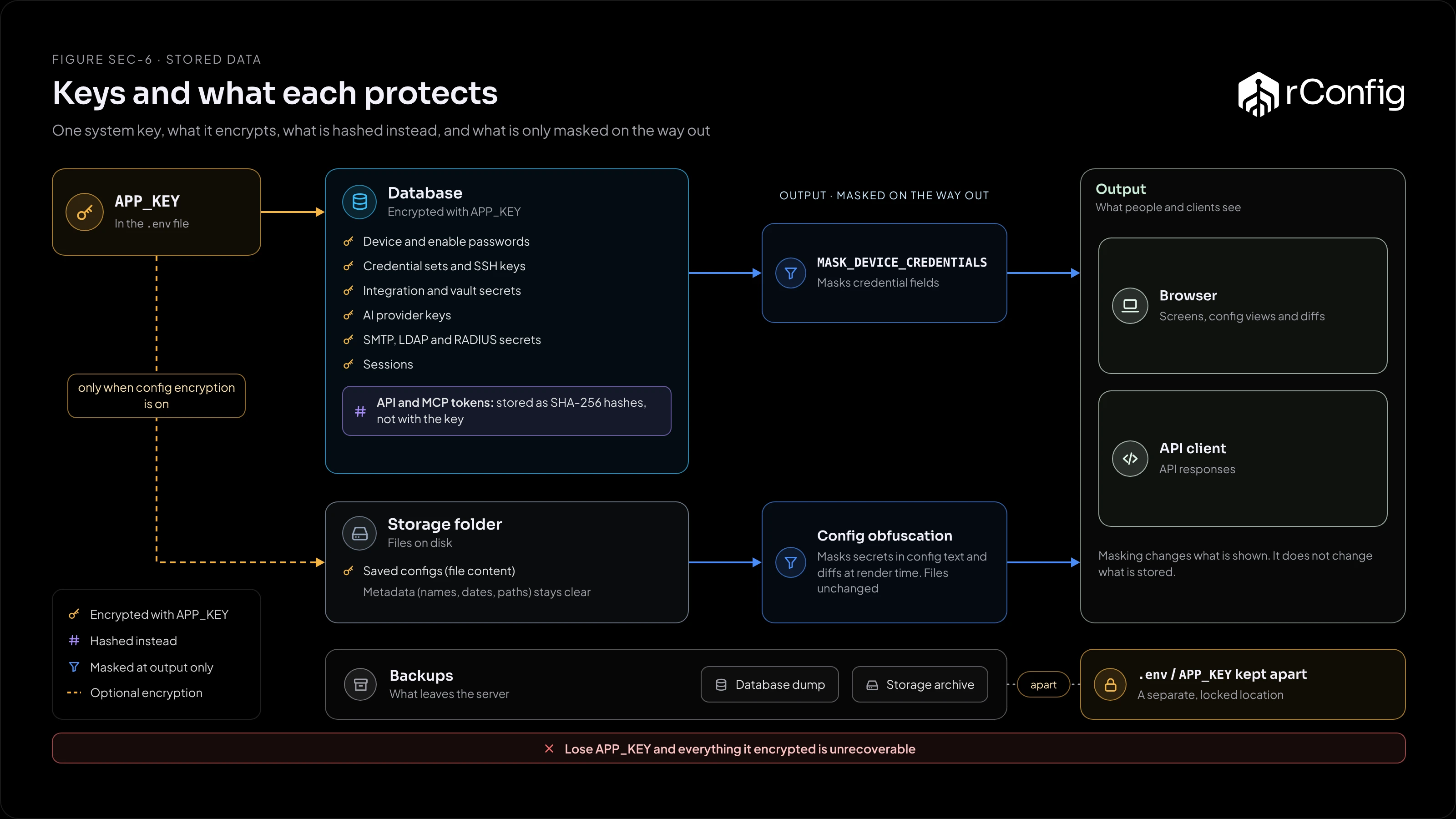
The system key
APP_KEY is a 256-bit key in the .env file, generated at install. rConfig uses it to encrypt every stored secret: device passwords and enable passwords, credential sets and their SSH keys, integration and vault secrets, AI provider API keys, and the mail, LDAP and RADIUS passwords. API and MCP tokens are different: rConfig stores only a SHA-256 hash of each token, so a database copy can’t be turned back into a working token.
The key is what makes a database backup safe to hold. A dump on its own shows ciphertext. A dump plus the key shows everything. Treat .env with the same care as a root password or a TLS private key: readable only by rConfig, never served over the web, never in version control, and backed up separately from the database.
Losing it, or changing it
There is no recovery without the key. If APP_KEY is lost, or regenerated with php artisan key:generate, every value encrypted with the old key becomes unreadable: device logins fail, integrations and vaults stop authenticating, and encrypted config files can’t be opened. A new key does not re-encrypt anything.
Rotating the key safely means decrypting everything with the old key and re-encrypting with the new one, and config encryption’s built-in rotate action is not implemented yet. The main docs ask you to contact rConfig support before any key rotation. Plan it as a change, with a backup, not as a quick fix after an exposure.
Config file encryption
Credential fields are always encrypted. Saved configs are not, unless you turn on config file encryption. By default they are plain files that only rConfig can read: from V8.4.1, saved configs are 0440 or 0640 and their folders 0750, so other local accounts can’t read them. Encryption adds a second layer for the cases file permissions don’t cover: a disk that leaves the building, a storage snapshot, or a backup copied somewhere less controlled.
It is turned on with the rconfig:config-encryption-manager command, which encrypts every existing config with APP_KEY and every new one from then on. Only the file content is encrypted; device names, timestamps and paths stay readable so listings and search keep working. Once it is on, the key matters even more: a lost key now costs the config history as well as the credentials. “The MAC is invalid” when opening a config means the file and the key don’t match; stop and restore rather than retrying.
Config obfuscation
Encryption protects data at rest. It does nothing once a user opens a config on screen, shares their screen or pulls a diff through the API. Config obfuscation (V8.1.2+) masks matching secrets, such as SNMP communities, enable secrets and local user passwords, in config text, search results and diffs as they are shown or returned. Rules are kept in the database, and chosen roles can be allowed to see unmasked output. The stored files are never changed, so backups and compliance checks still see the real config.
Backups of rConfig itself
A complete rConfig backup has four parts: the database, the storage folder, the .env file, and APP_KEY inside it. Miss the key and a restore brings back credentials and encrypted configs nobody can read. Built-in backups were removed in V8.4.1, so this is now your backup system’s job. See Backups.
Keep the parts apart. The database dump and the storage archive can go to your normal backup store. The .env file, or at least APP_KEY, belongs somewhere with tighter access: a password manager, a secrets store or an offline copy. That way a leaked backup is ciphertext, and a restore still has the key.
How Security Center checks this layer
The data at rest checks cover most of this page:
data.credentials_encrypted(Critical): stored credentials are encrypted andAPP_KEYcan still decrypt them. A failure after a key change means the key no longer matches the data.data.integration_secrets: integration secrets are encrypted (some were plain text before V8.4.2).data.config_folderanddata.config_file_modes: other local users can’t list or read saved configs. Users with thesecurity.updatepermission can apply the permission fix from the finding.data.storage_world_writable: no local user can plant files in rConfig’s storage.
The web exposure checks cover the other half of keeping .env safe: web.env_exposed and the storage and backup checks confirm none of these files can be fetched over HTTPS. In the app, the How rConfig protects your data card on Settings > Security Center shows whether config files are encrypted on this server.