

Segmented management network
rConfig holds the credentials and running configuration of every device it manages, so the network around it matters as much as the settings on it. This design puts rConfig on a dedicated management segment, lets people and API clients in only through controlled paths, and writes down every flow it needs as a firewall rule. It suits any single-site or single-server deployment, and it’s the base the other two reference designs build on.
Who it suits
- Teams with a management VLAN or VRF already, or building one.
- Any install that must not be reachable from user networks or the internet. Direct internet exposure of rConfig is not supported (see OS configuration).
- Auditors who want each permitted flow to have an owner and a reason.
The design
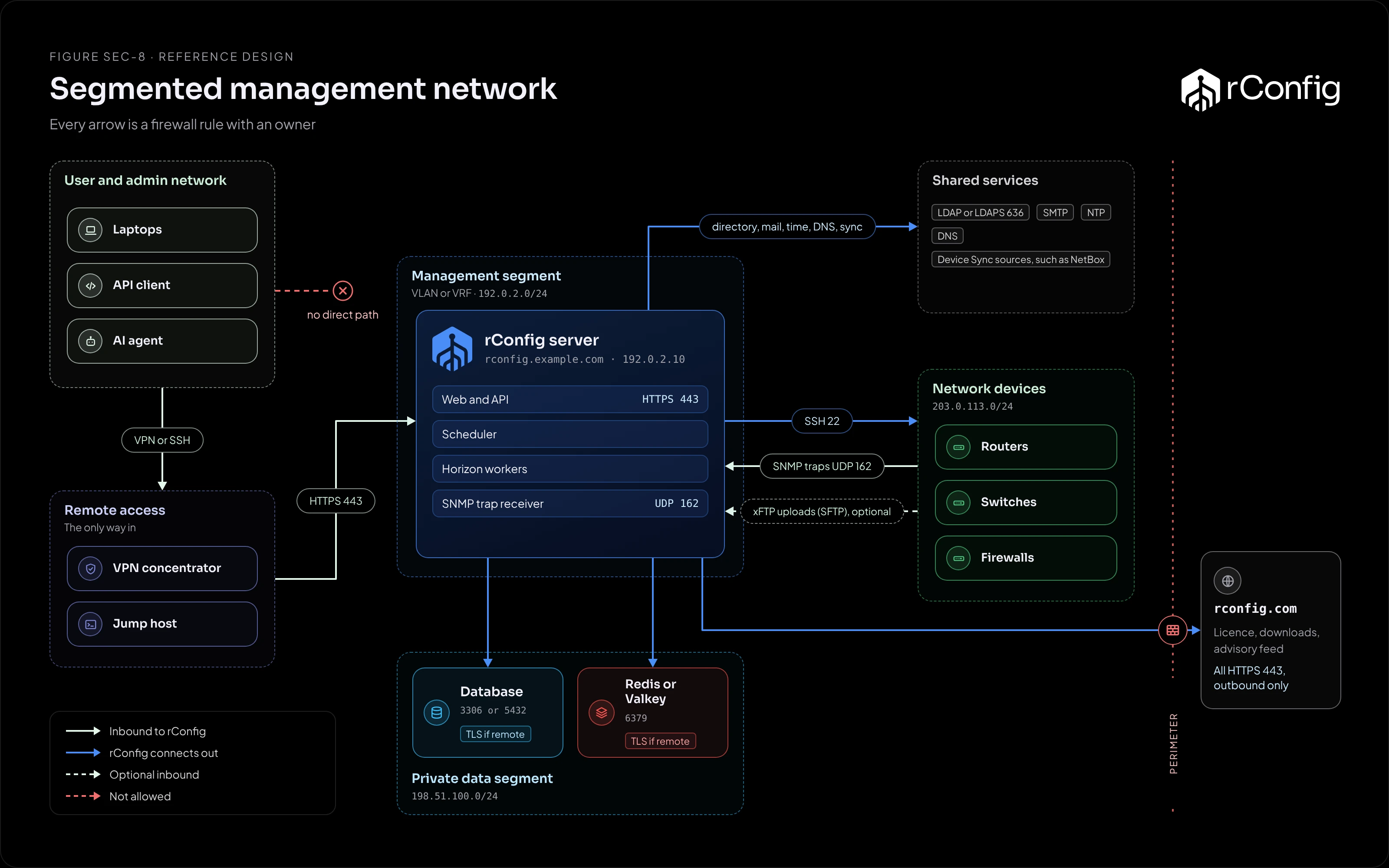
| Zone | What sits there | Reaches | Reached from |
|---|---|---|---|
| Management segment | The rConfig server | Devices, shared services, the data segment, rconfig.com | Jump host or VPN only |
| Private data segment | Database, Redis or Valkey (or both on the rConfig server itself) | Nothing | rConfig only |
| Network devices | Everything rConfig backs up | rConfig, for SNMP traps and xFTP uploads only | rConfig |
| Shared services | LDAP, SMTP, NTP, DNS, Device Sync sources | Nothing | rConfig |
| User network | Engineers, auditors, API clients | The jump host or VPN | Nothing in the management segment |
The simplest version keeps the database and Redis on the rConfig server, bound to loopback. Moving them to their own segment (for HA, or a shared database tier) is fine, as long as the connection is encrypted.
Trust boundaries and flows
Write each of these as an allow rule and deny everything else. The host firewall on the rConfig server should mirror the network firewall, so a mistake in one is caught by the other.
| From | To | Port | Why |
|---|---|---|---|
| Jump host or VPN | rConfig | TCP 443 | Web UI, REST API, MCP |
| Jump host | rConfig | TCP 22 | Server administration |
| rConfig | Devices | TCP 22 (TCP 23 only where unavoidable) | Backups, snippets, Web Terminal |
| Devices | rConfig | UDP 162 | SNMP traps, if used |
| Devices | rConfig | SFTP (or FTP, TFTP) | xFTP uploads, if used |
| rConfig | Database, Redis | 3306 or 5432, 6379 | Only when they are not on the rConfig server |
| rConfig | LDAPS, mail relay, NTP, DNS | 636, your relay’s port, 123, 53 | Sign-in, alerts, time, names |
| rConfig | Device Sync sources, AI provider | TCP 443 | Only the integrations you use |
| rConfig | rconfig.com, portal and download hosts | TCP 443 | Licence, updates, advisory feed |
| Vector Agents | rConfig | TCP 443, and 8443 for Vector Hub | Vector only (see MSP multi-tenant with Vector) |
Three rules matter more than the rest:
- Nothing from the user network straight to rConfig. People and API clients come through a jump host or the management VPN. That gives one place to apply MFA and log who connected.
- The database and Redis answer only rConfig. A Redis reachable from the network is one password away from the job queue.
- Devices never resolve back to rConfig. A device record whose address points at the rConfig server lets a signed-in user aim rConfig’s connections at its own services. Keep device addresses in the device segment.
Jump hosts
A jump host earns its place when it is the only way in: SSH and HTTPS to rConfig from it, MFA to reach it, and its own session logging. It also gives auditors one record of administrative access to compare with rConfig’s own activity log. Keep the rConfig server’s SSH limited to the jump host and to key-based logins; the root server check reviews the SSH daemon settings.
What Security Center verifies
Security Center runs on the rConfig server and checks the server end of this design every day. It can’t see your network firewalls, so pair it with your own firewall reviews.
| Part of the design | Checks |
|---|---|
| Host firewall active | os.firewall |
| Database and Redis not on the network | db.bind_address, redis.bind, redis.auth |
| Encrypted links to a remote database or Redis | db.transport_tls, redis.tls_remote |
| HTTPS only, with a valid certificate | app.url_https, web.https_redirect, tls.cert_expiry, tls.legacy_protocols |
| Nothing sensitive served over the web | web.env_exposed, web.storage_exposed |
| Devices kept on their own segment | runtime.device_targets |
| Encrypted device and service traffic | devices.telnet, devices.snmp_community, accounts.ldap_tls, integrations.smtp_tls |
| Time in step for logs and certificates | os.time_sync |
Trade-offs
- Database and Redis on the server, or on their own segment. Local and bound to loopback is the smallest attack surface. A separate tier is needed for HA and shared databases, and adds two encrypted links to run and monitor.
- Jump host, or VPN straight onto the segment. A jump host gives one choke point and one session log. A VPN is easier for day-to-day use, but every VPN user is then on the management segment.
- Outbound to rconfig.com, or not at all. Allowing HTTPS out to rConfig’s hosts keeps the licence, updates and the advisory feed current automatically. Blocking it is supported, and then the install behaves like an air-gapped one.
- Telnet devices. Some older devices only speak Telnet. Each one sends its credentials in clear text on every backup, so keep them on the shortest possible path and plan their replacement.