

Network Configuration Storage Optimization - Hard Links
Config Hard Link: Optimizing Configuration Storage
Section titled “Config Hard Link: Optimizing Configuration Storage”Config Hard Link keeps every unchanged backup viewable without storing another copy of the file. When a backup matches the previous version, rConfig records the backup and points it at the previous version’s file, so you can still open it and read its content while the disk holds one copy.
When to use this
Section titled “When to use this”Use it on commands where you have turned Keep Unchanged Config off to save disk space, but still want every backup in the history to open with its content. Stable fleets backed up daily get the most from it: thirty unchanged nightly backups of an edge switch become thirty viewable history entries backed by one file.
Prerequisites
Section titled “Prerequisites”- Keep Unchanged Config turned off on the command. Hard link only acts on that path. With the toggle on, rConfig already stores a full file for every backup and there is nothing to link. See Keep Unchanged Config Toggle.
- A user with the
setting.updatepermission to change the setting in the UI.
How it works
Section titled “How it works”On each backup rConfig compares the new output with the previous version, after diff exclusions are applied. When they match and Keep Unchanged Config is off, what happens next depends on Config Hard Link:
| Config Hard Link | What rConfig stores for the unchanged backup |
|---|---|
| Off | A history record with no file. The backup shows that it ran, but there is nothing to open. |
| On | A history record that points at the previous version’s file. It opens and shows the configuration like any other version. |
In both cases the new file is not kept, and the version number stays the same as the previous backup.
Hard link is a reference stored in the rConfig database, not a file system hard link. ls -l shows a link count of 1 on the shared file, and there are no file system requirements: it works on any storage rConfig can write to, including network mounts.
Turn it on
Section titled “Turn it on”From V8.4.3, Config Hard Link is set in the UI:
- Go to Settings → Features → Config Options.
- In the Config Storage section, turn on Config hard link.
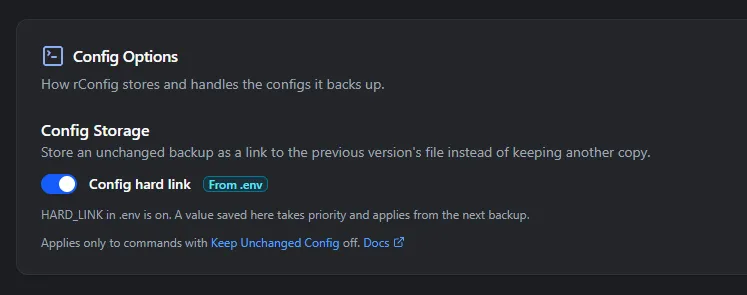 Screenshot may vary depending on your rConfig version.
The change applies from the next backup. You don’t need to restart Horizon or clear the config cache.
The badge next to the switch shows where the current value comes from:
| Badge | Meaning |
|---|---|
| Set here | Saved on this page. This value wins over .env. |
| From .env | Nothing saved on this page yet, so HARD_LINK in .env decides. |
| Default | Nothing saved here and HARD_LINK is not set in .env, so it is off. |
To go back to the .env value, click Use .env value. That clears the saved value.
Settings → System Optimization shows the value in force and where it came from, and links to this page.
The .env fallback
Section titled “The .env fallback”HARD_LINK in .env still works and applies until someone saves the setting in the UI. Upgrading to V8.4.3 does not copy the .env value into the UI, so an existing install keeps behaving exactly as before.
# Accepted as on: true, 1, yes, on# Accepted as off: false, 0, no, offHARD_LINK=trueAfter editing .env, run php artisan config:clear (or config:cache if you cache config) and restart Horizon so the backup workers read the new value.
See which backups are hard linked
Section titled “See which backups are hard linked”- Configs table: a Hardlink column appears once at least one hard-linked config exists, with a Yes badge on each one.
- Config view: the summary panel shows a Hard Linked Config section, with the original version’s ID under HardLink ID.
To check it on a test device, turn Keep Unchanged Config off for its backup command, run Download Now, wait for it to finish, then run it again without changing the device. The second backup shows Yes in the Hardlink column.
Deleting versions and retention
Section titled “Deleting versions and retention”Several history entries can share one file, so rConfig only removes a file when no remaining version uses it. From V8.4.3 this applies everywhere a config is deleted:
- Deleting a hard-linked version leaves the file in place for the original.
- Deleting the original leaves the file in place for the hard-linked versions that point at it. Their summary panel then shows no HardLink ID.
- Config retention purges old versions the same way. The file goes once the last version using it is purged.
Hard-linked versions are records without their own file, so retention counts them as non-downloaded configs and purges them on the non_downloaded_retention_days schedule in Data Purge.